


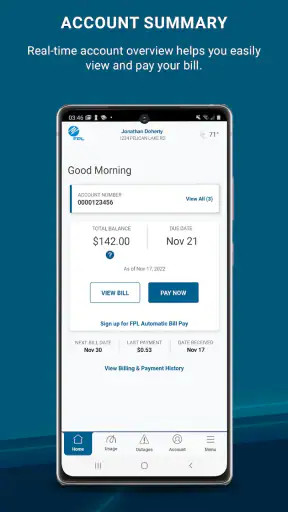
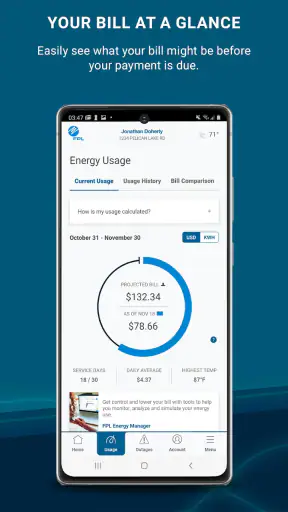
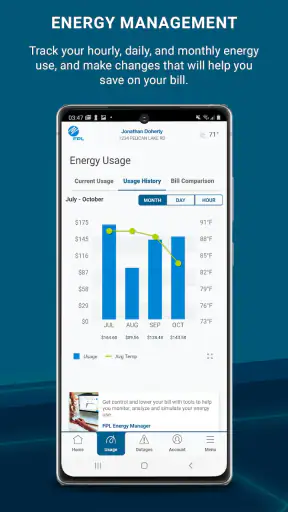
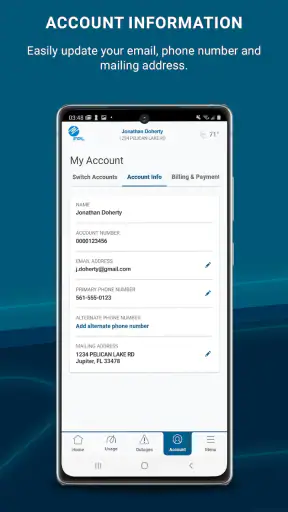
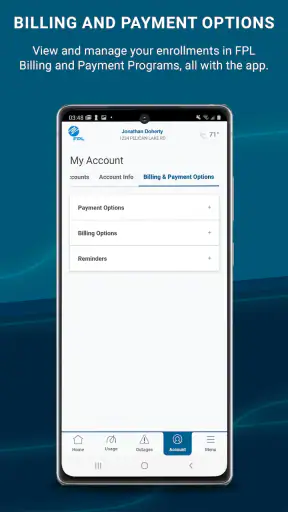
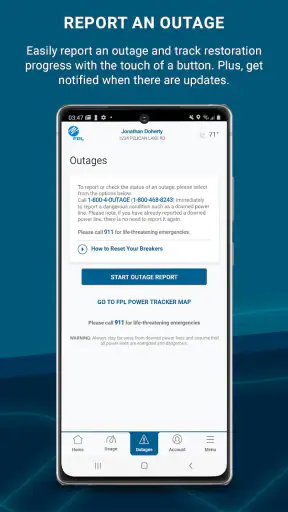
Managing an electricity account is usually easy when everything is working and surprisingly frustrating when one small sign-in or account detail gets in the way. I spent time using FPL as a mobile account tool, and my overall impression is that it is most useful when you want to handle routine Florida Power & Light tasks without opening a desktop browser. It is a free business app from NextEra Energy, Inc, aimed at giving customers access to their FPL account wherever they are.
The app is not trying to replace every way of dealing with an energy provider. Its value is narrower and more practical: it puts account access in a phone-friendly format for checking information and handling ordinary account moments while away from a computer. That makes it a sensible companion for people who already use FPL, especially those who prefer keeping household services in one place on their phone.
Where people usually get stuck
The first difficulty is often not the app itself but the relationship between the app and the account behind it. A mobile app can only show the information connected to the FPL login, so an incorrect email address, an old password, or a mismatch between household details and the account can make the experience feel broken before the main screen even appears.
I would begin with the simplest check: confirm that you are using the same FPL credentials you use through the provider’s regular online account access. It is easy to create confusion by trying a personal email when the account was registered with a household email, or by relying on a password saved in a browser that has since been changed. If the sign-in fails, repeatedly guessing is less useful than carefully checking the account details and using the normal recovery route associated with the account.
Another common point of friction is expecting the app to behave like a general-purpose utility marketplace. FPL is tied to an FPL account, not to every energy provider or every household service. If you are moving between providers, managing someone else’s service, or trying to work with an account that is not linked to your own login, the app may not be the right starting point.
That distinction matters for families and shared homes. One person may handle the account while another person needs information for a practical reason, such as checking a bill or confirming service details. The cleanest approach is to use the account holder’s established access rather than creating multiple improvised sign-in attempts. I also recommend deciding who will be responsible for account changes before using the app, because a mobile interface makes actions convenient but does not remove the consequences of changing account information.
The store rating gives a useful sense of its broad reception: FPL holds a 4.2 average from around 20 thousand ratings, with roughly 7 thousand written reviews. That is a healthy result for a utility account app, although ratings should not be mistaken for a guarantee that every sign-in or account situation will be smooth. Utility apps are especially sensitive to account status, service address, and temporary provider-side issues.
What I check before blaming the application
When something does not load, I first separate three possibilities: an account problem, a phone problem, or a provider-side problem. That simple separation prevents a lot of wasted effort. If the account cannot be accessed through the usual FPL web route either, reinstalling the mobile app is unlikely to solve the underlying issue. If the website works but the app does not, then the phone session, app version, or local connection deserves more attention.
I also avoid judging the app while connected to an unstable network. A weak Wi-Fi signal, a congested mobile connection, or switching between the two during sign-in can interrupt an otherwise valid session. Moving to a reliable connection and trying once more is a more useful test than repeatedly tapping the same button.
FPL is rated for Everyone, which suits its role as a household account utility rather than a specialist professional tool. It is also free, so there is no purchase decision to make before testing it. The real question is whether it fits your account and your preferred way of managing utility information.
Setup checks that save time
My recommended setup is deliberately boring. Install the current app, open it on a reliable connection, and have the FPL account credentials ready before starting. Avoid beginning the process while rushing through an airport, sitting in a poor-signal basement, or switching between several password managers and browsers. A calm first login makes it easier to tell whether the issue is with the account or with the device.
The application has been available since June 5, 2017, and its current version is 6.30.0. It supports devices running operating system version 9 or later. That minimum requirement is important for anyone using an older phone: if the device falls below that level, the sensible solution is not to force an installation but to use another supported way of accessing the FPL account.
Before signing in, I would make three practical checks:
- Confirm the phone meets the minimum operating-system requirement and has enough free space for a normal app installation.
- Check that the device’s date and time are set correctly, since unusual system settings can interfere with secure account sessions.
- Keep the FPL login details available without repeatedly switching between apps during the first sign-in.
These checks are not glamorous, but they are more valuable than treating every problem as a software defect. They also help answer a question many users have before downloading: will the app work on an older phone? It will work only where the device meets the listed operating-system requirement, so owners of older hardware should verify that point first.
Once access works, I recommend taking a moment to learn the layout rather than immediately changing account details. Utility apps are often used during stressful moments, such as a suspected outage or a payment deadline. Knowing where the account information is located beforehand makes the app much more useful when you are distracted or away from home.
A useful habit is to open the app occasionally during a calm moment, not only when something is urgent. That gives you a chance to notice whether the session remains active, whether the account information looks familiar, and whether the installed version is still current. It also avoids discovering a sign-in problem at the exact moment you need account access.
A realistic household scenario
Imagine that I am away from home and need to check an FPL account detail before arranging something with a family member. Opening a laptop may be inconvenient, while using a phone is immediate. I would connect to a dependable network, open the app, sign in with the established account, verify that the displayed account is the expected one, and then leave the app rather than making unnecessary changes.
The important lesson is that mobile convenience is strongest for short, focused tasks. I would not use a rushed phone session to experiment with unfamiliar account settings. If the action has a lasting effect on service or billing information, I would slow down, read each screen carefully, and confirm the account identity first. The app makes access portable; it does not make important decisions risk-free.
That is also where FPL compares favorably with the usual alternative of a mobile browser. A browser can provide account access too, but an installed app is easier to reach and feels more natural for a quick check. On the other hand, a browser may be preferable on a shared device, on a phone that cannot meet the app requirement, or when you do not want to keep a utility app installed.
Recovering a workflow when access fails
When the app stops behaving normally, I use a gradual recovery process. First, I close it completely and reopen it. Then I check the network and try again without rapidly repeating the failed action. If the problem continues, I compare the result with the regular FPL online account route. This comparison is valuable because it tells me whether the account itself is reachable.
If the web account works but the app does not, I would check whether an update is available, restart the phone, and then try a fresh session. A fresh session matters because a stale login state can create confusing behavior: the app may open, but a particular account screen may not refresh correctly. Signing out and back in can help, although I would avoid doing that if I am not certain I know the correct credentials.
Reinstalling should be a later step rather than the first reaction. It can clear local app problems, but it also removes the convenience of an existing session and means repeating setup. Before reinstalling, I would make sure I can sign in successfully through the normal FPL account channel. Otherwise, the reinstall may leave me with the same account problem and less local information than before.
There is a useful trade-off here. Keeping an app installed gives faster access, but it also means the phone may retain a session that eventually needs refreshing. Using a browser avoids maintaining another installed application, yet it usually adds more steps when I need quick access. I prefer the app for regular personal use and the browser as a fallback or for occasional access on a different device.
If the app opens but the information appears outdated, I would not immediately assume that the phone has lost data. Account information can depend on the provider’s systems, the timing of a recent change, and whether the session has refreshed. I would wait briefly, reopen the account, and compare it with the standard online access route before taking further action.
One of the more useful habits is to record the exact point of failure in plain language. “The app will not open” is different from “the app opens but sign-in is rejected,” which is different again from “sign-in works but account information does not refresh.” That distinction makes any later support conversation more efficient and prevents repeating irrelevant fixes.
When persistence is not the best solution
There are situations where I would stop troubleshooting the app and use another channel. If the account is inaccessible everywhere, the issue is probably not limited to the mobile installation. If the phone does not meet the operating-system requirement, a supported browser or another compatible device is more sensible. If the matter is urgent and the app is behaving unpredictably, I would use the provider’s established alternative access method instead of repeatedly retrying a critical action.
This is especially important for people who manage several properties or accounts. A single consumer-focused mobile experience may be convenient for a personal household account but less suitable for complicated administration. In that case, a larger-screen browser workflow can make account selection and record-keeping easier, even if the app remains useful for quick checks.
When the app is not the cause
Utility account access depends on more than the application installed on the phone. A service-address change, a recently updated account, a forgotten credential, or a provider-side interruption can all appear on the surface as an app failure. I find it helpful to ask what changed immediately before the problem appeared. If nothing changed on the phone but the account was recently modified, the account transition deserves attention first.
Network conditions are another easy-to-miss factor. A phone may show full signal while the actual connection is slow or unstable. Switching once between dependable Wi-Fi and mobile data can reveal whether the problem is local connectivity. I would not keep switching back and forth repeatedly, because that makes the result harder to interpret.
Phone storage and system health can matter as well. An almost-full device may behave strangely across several applications, not only FPL. If other apps are also crashing, failing to refresh, or taking unusually long to open, I would treat that as a device-maintenance issue. Restarting the phone and freeing a little space are reasonable general steps before focusing on one application.
Security settings can create friction too. I would avoid installing unofficial copies, sharing credentials casually, or using a public device for sensitive account access. The app is intended for Everyone in age-rating terms, but that does not mean account information should be handled carelessly. A household utility account still deserves the same basic attention as any other personal service account.
Another question readers often have is whether the app is suitable for someone who is not the primary account holder. My practical answer is that it is best for the person with legitimate access to the relevant FPL account. If you need information from another household member’s account, the clean solution is to coordinate with that account holder rather than treating the app as a shared anonymous lookup tool.
People also ask whether a free app can replace every other account-management option. In my experience, it is better viewed as a convenient access point, not as a reason to abandon all alternatives. A browser remains useful for unsupported devices, occasional access, and situations where the app needs troubleshooting. Having both options available is more reliable than depending on either one exclusively.
With more than one million installs, FPL is clearly used at a broad scale, but that does not change the personal nature of the experience. The app’s usefulness depends heavily on whether you are an FPL customer, whether your account details are in order, and whether your device meets the technical requirement. Those are more important decision points than the install figure itself.
My practical verdict
I recommend FPL to existing FPL customers who want a straightforward mobile route into their account. In my view, its strongest quality is convenience during small, real-life moments: checking an account while away from a computer, confirming information before speaking with someone at home, or keeping utility access close at hand. The fact that it is free removes a major barrier to trying it.
I would be more cautious about recommending it to someone who expects a universal energy-management app, needs access to several unrelated providers, or uses a phone below the required operating-system level. Those users may be better served by a browser or by whatever account tools their specific provider supports. The app is focused, and that focus is useful only when your situation matches it.
The main limitation is not necessarily a missing feature; it is the dependence on account and service conditions outside the phone. A perfect installation cannot fix incorrect credentials, an account that is not properly linked, an unstable connection, or a provider-side interruption. Understanding that before downloading prevents unrealistic expectations and makes troubleshooting much less frustrating.
After using it, I see FPL as a practical companion rather than an app I would open for entertainment or exploration. It earns its place on a phone when quick account access matters and when the user is already part of the FPL ecosystem. I would keep the regular online access route available as a backup, maintain the app through normal updates, and use the gradual recovery steps above before assuming something more serious is wrong.
For that audience, the best reason to choose FPL is dependable convenience for everyday account access, not a promise that every problem can be solved inside the app. Developed by NextEra Energy, Inc, it has been available for years, remains free, and carries an Everyone age rating. My final view is positive but practical: install it if you manage an FPL account and want your phone to be the quickest place to reach it, but keep a browser-based fallback for older devices, complicated account situations, and moments when the issue clearly lies beyond the app.


